Built by the DILM Suite team led by Andy Leonard
Trusted by enterprise SSIS teams
From the author of SQL Server Integration Services Design Patterns 2nd Edition
The SSIS Catalog Was Never Finished.
SSIS Framework completes it.
- ✗ Jobs fail and you restart from the beginning
- ✗ Dependencies live in someone's head
- ✗ Deployments drift between environments
- ✗ SQL Agent is doing orchestration it was never designed for
Run SSIS like an enterprise application.
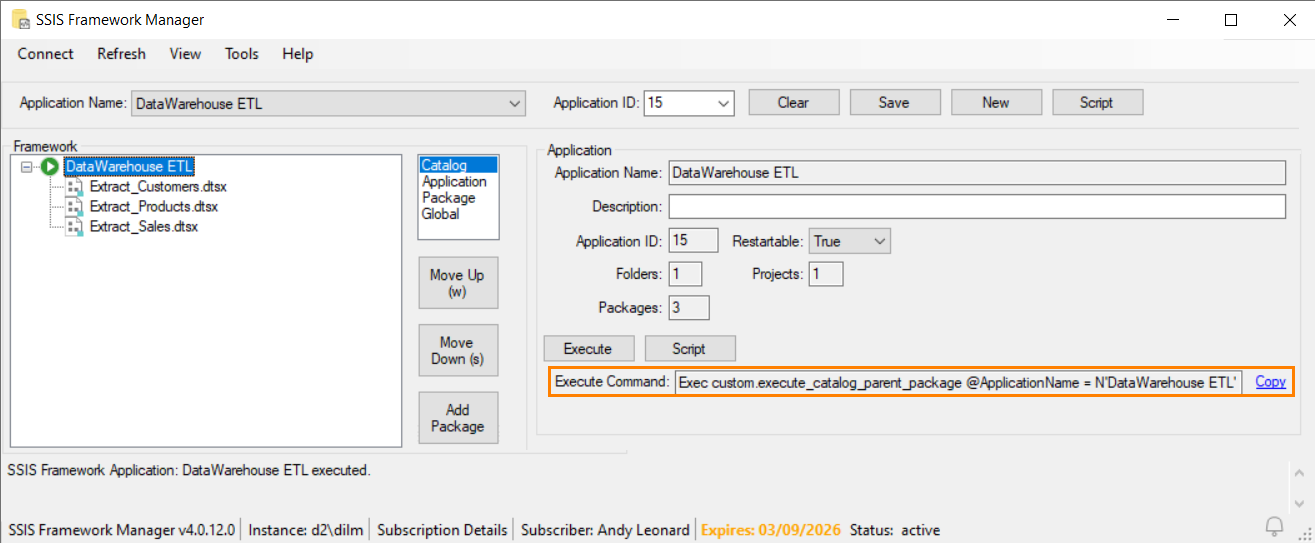
Copy the generated command directly into SQL Agent, cron, or any scheduler.
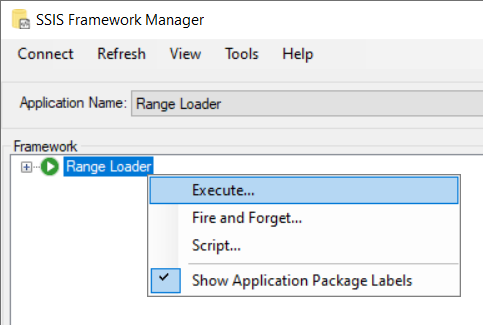
Define execution order, restart behavior, and cross-project orchestration in minutes.
Used by teams running SSIS in production across healthcare, finance, and enterprise environments
The Problem
You followed best practices. Now you're stuck managing them.
You deployed SSIS the right way.
Projects. Packages. Environments. SQL Agent jobs.
And now:
- •Execution logic is scattered across jobs and scripts
- •Restarting from failure means rerunning everything
- •Cross-project orchestration is manual and fragile
- •Visibility is limited when something breaks
- •Small changes require too much coordination
"You now have a bunch of SSIS packages that require executing in some order. What's a data engineer to do?"
The SSIS Catalog executes packages. It does not manage applications.
No Orchestration
The Catalog deploys packages. It doesn't run them in order.
Project Boundaries
Execute Package Task is locked to a single project. Cross-project calls blocked.
Full Re-Runs on Failure
ETL fails at package 47 of 71? Restart from 1. Hours wasted.
The Solution
Run SSIS like an application, not a collection of packages
SSIS Framework is a metadata-driven orchestration engine on top of the SSIS Catalog. Define execution order once. Control behavior centrally. Run entire applications with confidence.
-- Package 1 of 71...
EXEC [SSISDB].[catalog].[create_execution]
@package_name = 'Extract_Customers.dtsx',
@folder_name = 'ETL',
@project_name = 'DataWarehouse',
@execution_id = @exec_id OUTPUT
EXEC [SSISDB].[catalog].[start_execution] @exec_id
-- Wait... check status... handle errors...
-- Now repeat for packages 2 through 71
-- 500+ lines of brittle T-SQL
Why SSIS Framework
Built for real SSIS production environments
Stop Managing Packages One at a Time
Define an SSIS Application—a collection of packages configured to execute in a specific order. Add new packages by adding metadata rows, not code. Remove them the same way.
Metadata-driven orchestration →
Break Free from Project Boundaries
The Execute Package Task locks you into a single SSIS project. SSIS Framework orchestrates packages across any project, any folder in the Catalog. Share utility packages across applications without duplication.
Cross-project execution →
All orchestrated as a single application
Restart from Failure, Not from Zero
Your ETL fails at package 47 of 71 at 3 AM. Without a framework, you re-run all 71. With SSIS Framework, you restart from package 47. Hours saved. Every time.
Application restartability →
Pkg 1-46: ✔ Complete (skipped on restart)
Pkg 47: ✘ Failed ← Restart here
Pkg 48-71: ⏸ Pending
Know Exactly What Ran, When, and Why
Every package execution gets a discrete ID in the SSIS Catalog. Your DBA can see exactly which packages ran, in what order, with what parameters. Root cause analysis in minutes, not hours.
Centralized logging & governance →
SSIS Framework is one piece of the complete picture
The DILM Suite Bundle gives your team all three tools — capture change, deploy with precision, and execute with control across every environment.

Capture Change
SSIS Catalog Compare scripts your entire SSIS Catalog in minutes and generates CATPAC and SCCPAC deployment artifacts — so you know exactly what changed before you deploy.
Package Deployment
DILM Deployment Utility moves your packages between environments with precision — no guesswork, no fragile scripts. Promote with confidence from dev to test to production.
Execute with Control
SSIS Framework Manager orchestrates execution across projects and folders with metadata-driven scheduling, restartability, and centralized logging — completing what the SSIS Catalog started.
Includes SSIS Catalog Compare, DILM Deployment Utility, and SSIS Framework Manager
Pricing
Simple licensing. Immediate value.
Run SSIS as an application with orchestration, restartability, and centralized control.
SSIS Framework
Streamline SSIS DevOps with Framework Manager
- ✔ Metadata-driven orchestration
- ✔ SSIS Framework Manager
- ✔ T-SQL script generation
- ✔ Framework database & documentation
- ✔ One year of SSIS Premium training
DILM Suite Bundle
The complete SSIS lifecycle management toolkit
- ✔ Everything in SSIS Framework
- ✔ SSIS Catalog Compare
- ✔ DILM Deployment Utility
- ✔ Full SSIS lifecycle management
SSIS Catalog Compare
Enterprise-Grade Lifecycle & DevOps for SSIS
- ✔ Compare SSIS Catalog environments side-by-side
- ✔ Identify drift between Dev, QA, and Production
- ✔ Built for enterprise SSIS DevOps workflows
The Ecosystem
SSIS Framework Is Just the Start
Part of the DILM Suite—a complete toolkit for Data Integration Lifecycle Management. Every tool works together.

SSIS Framework
Metadata-driven orchestration. Execute entire SSIS applications with a single command.
Featured Product
SSIS Catalog Compare
Compare and deploy SSIS Catalogs across environments. Script entire folders with dependency ordering.
From $2,290/year
SSIS Framework Manager
Visual management tool for SSIS Framework. Create, configure, and execute applications from a GUI.
Included with commercial editions
SSIS Catalog Browser
Single treeview of your entire SSIS Catalog. See every artifact, property, and configuration at a glance.
FreeSSIS Training
From Zero to SSIS, Expert SSIS, and Master the SSIS Catalog. Live and recorded courses from Andy Leonard.

DELM Suite
From Data Engineering Management Suite. Moving to Microsoft Fabric? DELM Suite includes Fabric Navigator, Pipeline Navigator, and AI Playbook.
Data Engineering Lifecycle Management
About the Builder
Andy Leonard
Built by someone who has lived this problem.
Andy Leonard is a data engineer, consultant, and author focused on real-world SSIS lifecycle challenges. He has helped enterprise teams design, build, and operate SSIS solutions at scale across industries. He writes the Engineer of Data newsletter, has authored or co-authored 12+ books on data integration, presented at 100+ international conferences, and has been building SSIS solutions for over two decades.
"I Am Here To Help."
Andy literally wrote the book on SSIS frameworks. His SQL Server Integration Services Design Patterns 2nd Edition (Apress) is the definitive guide to managing SSIS in the enterprise. The SSIS Framework is the culmination of decades of real-world consulting distilled into tooling you can deploy today.
What People Say
Built from real-world SSIS challenges
Teams use SSIS Framework to reduce operational friction across real SSIS production environments:
-
✔
Reduce SQL Agent job complexity
Replace scattered orchestration scripts with one metadata-driven execution model.
-
✔
Improve reliability in production
Restart from the point of failure instead of rerunning successful work.
-
✔
Gain visibility into execution
Centralized logging gives you a clearer view of what ran and what failed.
-
✔
Standardize orchestration across teams
Use one consistent model across projects, folders, and environments.
FAQ
Common questions from SSIS teams
No. SSIS Framework works with your existing SSIS Catalog and packages. No rewrites, no migrations, no changes to what you have already built.
It replaces the need to manage orchestration through scattered jobs and scripts. SQL Agent can still schedule the Framework execution call — but the orchestration logic lives in metadata, not in dozens of brittle jobs.
Yes. You can implement SSIS Framework incrementally — start with one application, prove the value, then expand. There is no requirement to migrate everything at once.
Yes. Designed for teams managing SSIS across multiple projects and environments. Centralized logging, restartability, and cross-project orchestration — all the things production teams need.
Stop managing SSIS manually
You already built the packages.
Now run them like an application.
SSIS Framework gives you orchestration, restartability, and control—without changing your platform.
Starting at $990/year
Perpetual licensing available
Works with your existing SSIS Catalog
Need help evaluating SSIS Framework for your team?
Schedule a Consultation